
A few years ago, “free AI tools” usually meant a watered-down demo designed to nudge you toward a credit card. That’s changed. Competition among AI companies has pushed genuinely useful, no-cost tiers into the mainstream — tools you can use for real work, not just to kick the tires. You don’t need a corporate budget or a subscription habit to benefit from modern AI anymore.
The rapid evolution of artificial intelligence has democratized high-powered software, allowing anyone with an internet connection to access enterprise-grade productivity, design, development, and research systems. In the current digital landscape, utilizing these applications is no longer an optional luxury but a fundamental strategy for optimizing daily workflows.
This guide rounds up an extensive, deeply researched compilation of 25 free AI tools worth having in your bookmarks, organized by what you’re actually trying to get done: chatting and research, writing, images, video, presentations, audio, coding, and everyday productivity. Every tool listed has a usable free tier — not just a seven-day trial that expires right when you’ve gotten comfortable with it.
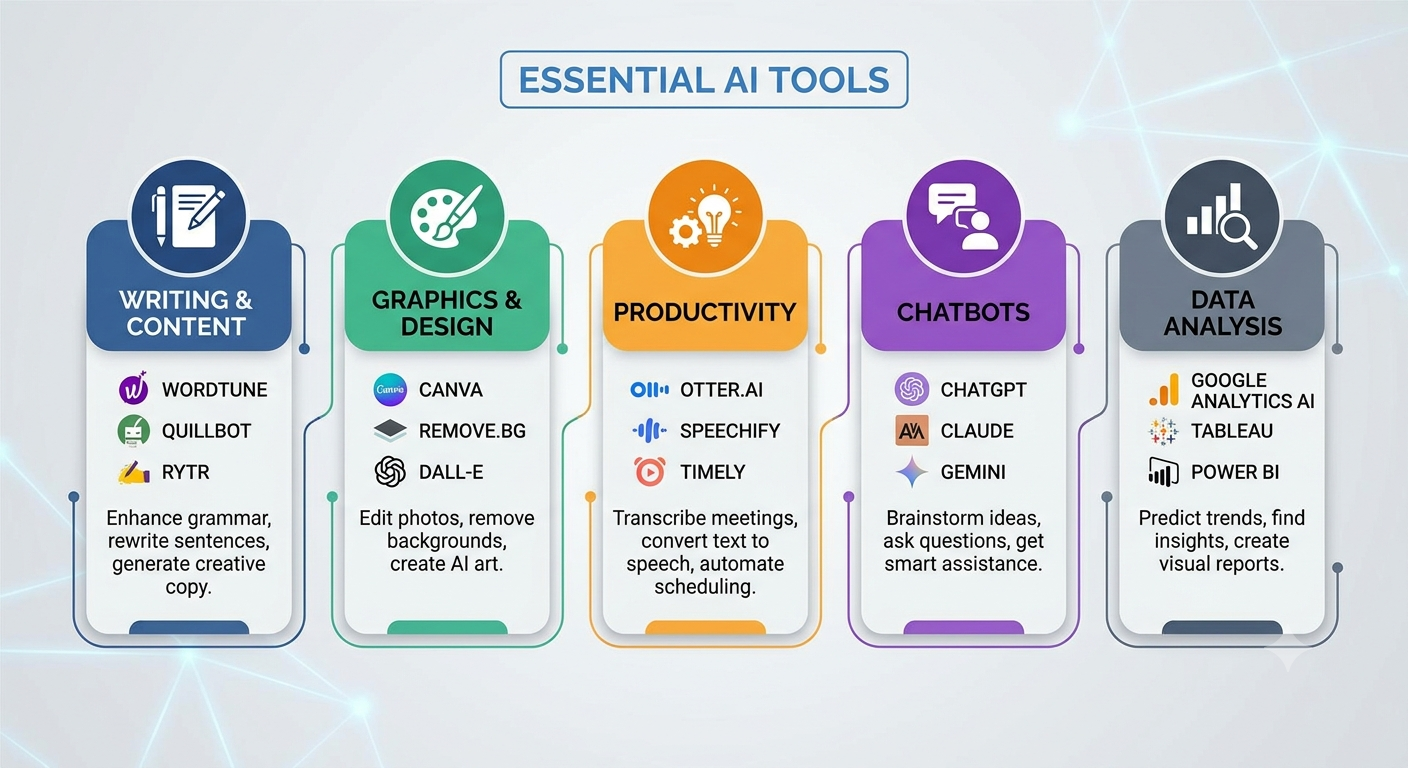
Table of Contents
AI Chatbots and Research Assistants
Discover how AI chatbots and research assistants improve productivity, automate research, enhance customer support, and simplify daily tasks for businesses, students, and professionals.
1. ChatGPT (Free tier)
Still the most recognizable name in the space, and still a solid all-rounder. The free version gives you access to a lighter version of OpenAI’s flagship model, along with basic image generation, file uploads, and web browsing. It’s the tool most people reach for first when brainstorming, drafting, or just asking a quick question.
2. Claude
Anthropic’s assistant is known for careful reasoning and writing that doesn’t feel robotic. The free plan includes web access, chat memory, and the ability to generate documents and files directly in conversation — handy if you want more than just a wall of text back.
3. Google Gemini
Because it’s baked into the Google ecosystem, Gemini has an edge for anyone already living in Docs, Sheets, or Gmail. The free tier covers everyday chat, research, and light content generation, and it plays nicely with other Google apps without extra setup.
4. Perplexity
Think of this as a search engine that shows its work. Instead of a wall of blue links, Perplexity gives you a synthesized answer with sources cited inline, which makes it genuinely useful for fact-checking or getting up to speed on an unfamiliar topic quickly.
5. Google NotebookLM
This one deserves more attention than it gets. Upload your own PDFs, articles, or notes, and NotebookLM builds an AI assistant that only knows what you fed it — no hallucinated tangents from the wider internet. It can generate study guides, flashcards, and even a podcast-style audio conversation summarizing your material, which is oddly effective for people who learn better by listening.
6. HuggingChat
If you’d rather use open-source models instead of a closed commercial system, HuggingChat gives you free access to a rotating lineup of community – and research-built language models. It’s less polished than the big commercial names but appeals to anyone curious about the open-weight side of AI.
AI Tools for Writing and Editing
Writing and editing AI tools have transformed the way individuals and businesses create high-quality content. These intelligent platforms help generate blog posts, articles, emails, marketing copy, social media captions, reports, and creative writing in less time while maintaining clarity and consistency.
Advanced AI features also improve grammar, spelling, readability, tone, and sentence structure, making content more engaging and professional.
Whether you are a student, freelancer, marketer, business owner, or content creator, AI writing assistants can boost productivity, reduce editing time, and inspire new ideas.
When combined with human creativity and fact-checking, these tools become valuable partners for producing accurate, original, and compelling content.
7. Grammarly
The free version checks grammar, spelling, tone, and clarity as you type, whether you’re writing an email, a school paper, or a Slack message. It’s been around long enough to feel unremarkable, but that’s exactly why it’s still one of the most reliably useful tools on this list.
8. QuillBot
Paraphrasing, summarizing, grammar checking, and basic plagiarism scanning are all bundled into QuillBot’s free tier. It’s popular with students rewriting awkward sentences or trying to shorten a bloated paragraph without losing the point.
9. Copy.ai
Marketing copy, product descriptions, and social captions are Copy.ai’s bread and butter. The free plan is generous enough for someone running a small side project or managing a single brand’s content calendar without needing a full-time copywriter.
AI Tools for Image Generation and Editing
Image generation and editing AI tools help users create, enhance, and transform visuals with remarkable speed and accuracy.
From designing marketing graphics to editing photos and generating digital artwork, these intelligent platforms boost creativity while saving time.
Businesses, content creators, designers, and marketers use AI-powered image tools to produce professional-quality visuals, streamline workflows, and improve visual content for websites, social media, and branding.
10. Canva (with AI features)
Canva has quietly become one of the best entry points into AI image generation for non-designers. Its built-in AI tools handle image generation, background removal, and layout suggestions inside a design suite that most people already know how to use.
11. Ideogram
Text inside AI-generated images has historically looked like garbled alphabet soup. Ideogram largely solved that problem, making it a strong free choice for posters, thumbnails, or social graphics where the words actually need to be legible.
12. Adobe Firefly
Firefly powers the Generative Fill and Generative Expand features inside Photoshop, letting you extend or alter parts of a photo using AI without needing a full Creative Cloud subscription. The free tier gives you a limited number of monthly credits, enough for occasional touch-up work.
13. Leonardo.Ai
Popular with game developers and hobbyist artists, Leonardo.Ai offers fine-grained control over image style and composition, with a free daily credit allowance that’s enough to experiment seriously without paying anything.
14. Remove.bg
A one-trick tool, but it does that trick extremely well: upload a photo, and it strips the background out in seconds. Useful for product photography, profile pictures, or quick graphic design work.
Video and Presentation AI Tools
Video and presentation AI tools help users create professional content faster by automating editing, design, captions, voiceovers, and slide creation.
These smart tools improve productivity for businesses, educators, marketers, and content creators by turning ideas into engaging videos and presentations within minutes.
AI-powered features such as templates, script generation, image enhancement, and automatic transitions reduce manual work while maintaining high quality.
Whether for online courses, social media, sales pitches, or business meetings, modern AI tools make visual communication easier, faster, and more effective.
15. Gamma
Typing out a topic and getting a full, visually coherent slide deck back in return sounds like a small thing until you’ve actually done it at 11 p.m. before a morning meeting. Gamma’s free credits cover a handful of presentations a month, more than enough for casual use.
16. Runway
Runway offers free credits toward short AI-generated video clips, plus a set of editing tools like background removal and motion tracking that are useful even if you never touch the video generation feature itself.
17. Kling AI
Known for cinematic-looking output and consistent character rendering across a video, Kling gives free daily credits that are enough for prototyping short clips or storyboarding an idea before committing to a full production.
18. HeyGen
Need an on-camera presenter but don’t have a camera, studio, or presenter? HeyGen generates avatar-led videos with lip-synced speech in dozens of languages. The free tier includes a small amount of video time, enough to test whether it fits your workflow.
19. Loom
Loom’s free plan supports quick screen recordings with AI-generated titles, summaries, and chapter breakdowns. It’s especially handy for async work — recording a walkthrough once instead of explaining the same thing in five separate meetings.
Audio and Voice Tools
Audio and voice tools powered by artificial intelligence are transforming the way people create, edit, and manage audio content.
From realistic text-to-speech conversion and voice cloning to transcription, podcast editing, and speech enhancement, these tools save time while improving quality and efficiency.
Whether you’re a content creator, marketer, educator, or business owner, AI audio solutions help streamline workflows and boost productivity.
Explore the best audio and voice tools to produce professional-quality recordings with less effort and greater accuracy.
20. ElevenLabs
The current standard-bearer for AI voice, ElevenLabs, handles text-to-speech, voice cloning, and transcription, with a free tier generous enough to experiment with narration, voiceover, or accessibility features.
21. Suno
Describe a song — genre, mood, instrumentation — and Suno generates a complete track, vocals included. The free daily credit allowance is enough to make background music for a video or a jingle for a small project, provided it’s for non-commercial use.
Coding and Development
Coding and development AI tools are transforming the way software is built by helping developers write cleaner code, detect bugs faster, automate repetitive tasks, and improve overall productivity.
From code generation and debugging to testing, documentation, and project management, these intelligent tools support both beginners and experienced programmers.
Whether you’re creating websites, mobile apps, or enterprise software, AI-powered development assistants can accelerate workflows, reduce errors, and help deliver high-quality applications more efficiently while encouraging faster learning and innovation.
22. Cursor
Built on top of a familiar code editor interface, Cursor layers AI assistance directly into your workflow: autocomplete, chat-based debugging, and multi-file edits. The free tier covers casual coding and small projects well.
23. Google AI Studio
A free, developer-facing environment for experimenting with Google’s models directly, without building a full app around them first. It’s a good starting point for anyone who wants to test prompts or small AI-powered scripts before committing to paid API usage.
Productivity and Meetings
Productivity and meeting AI tools help individuals and teams save time by automating scheduling, note-taking, transcription, task management, and collaboration.
These intelligent solutions improve communication, organize workflows, reduce manual effort, and boost workplace efficiency.
Whether for remote teams or businesses, AI-powered productivity tools simplify daily operations and enhance overall performance.
24. Fireflies.ai
Point it at your Zoom, Teams, or Google Meet calls, and Fireflies transcribes the conversation, then pulls out decisions and action items automatically. The free tier includes unlimited transcription with a capped amount of storage, which is plenty for most individuals.
25. Taskade
Part project management tool, part AI assistant, Taskade combines task lists, mind maps, and small AI agents that can help draft plans or organize a messy brainstorm into something actionable. The free plan supports unlimited projects, which is rare for a tool in this category.
How to Actually Get Value Out of Free Tiers
Having a long list of tools is only half the equation — the other half is using them without hitting frustration walls. A few things worth keeping in mind:
Match the tool to the task, not the hype. A general chatbot can technically write a caption, summarize a meeting, and generate an image, but purpose-built tools almost always do each of those jobs better and faster. Use the all-rounders for exploration and the specialists for execution.
Watch your usage windows. Most free tiers reset daily or monthly rather than giving you one-time credits, but a few genuinely are one-and-done. Before you build a habit around a tool, check whether the free allowance renews — it changes how you should plan your work around it.
Don’t assume free means limited forever. Companies adjust their free tiers constantly, sometimes generously, sometimes not. A tool that felt restrictive six months ago might now include features that used to be paywalled, and vice versa. It’s worth periodically revisiting tools you dismissed early on.
Combine tools instead of picking one. The most efficient workflows in 2026 rarely rely on a single AI tool doing everything. A common pattern: research with Perplexity or NotebookLM, draft with Claude or ChatGPT, polish the language with Grammarly, and turn it into visuals with Canva or Gamma. Each tool does one part of the job well instead of doing everything adequately.
Be mindful of data and privacy. Free tiers are often subsidized by data usage for model training or by ads. Before uploading sensitive documents, client information, or anything under an NDA, check the tool’s data policy — some let you opt out of having your content used for training; others don’t offer that option on the free plan.
How to Choose the Right AI Tool
Choosing the right AI tool means matching it to the task, not chasing trends. Start by identifying what you actually need to produce — a blog post, a meeting summary, or code all require different tools, even if each is “AI-powered.” General chatbots like ChatGPT or Claude suit open-ended, exploratory tasks, while specialist tools (Grammarly, Canva, Fireflies) work better once the output is clearly defined.
If your task depends on specific documents or data, choose a tool that works only from what you provide, rather than one that pulls broadly from the internet and risks inaccuracies.
Balance ease of use against output quality — some tools need careful prompting, while others work well with minimal effort.
Before relying on a free tier, understand its real limits: whether usage resets regularly or is a one-time allowance.
Also consider privacy — free tools may use your data for training, so avoid uploading sensitive material without checking opt-out options.
Test tools with real work rather than generic prompts to judge genuine fit. Finally, combine a small set of tools for different stages of a task instead of expecting one tool to handle everything. The guiding principle: use general tools for fuzzy problems, specialist tools for well-defined ones.
If You’re a student, try
- ChatGPT
- Perplexity AI
- Grammarly
- Notion AI
- Otter.ai
For Content Creators – Try
- Canva AI
- Leonardo AI
- Adobe Firefly
- CapCut AI
- Descript
Specially for Business Owners
- Microsoft Copilot
- Gamma
- Tome
- ChatGPT
- Grammarly
Developed For Developers
- GitHub Copilot
- Codeium
- Replit AI
- Hugging Face
Designed For Designers
- Canva AI
- Pixlr AI
- Remove.bg
- Adobe Firefly
- Ideogram
Benefits of Using Free AI Tools
Here are the simple benefits of using free AI tools:
- No cost barrier – You can access powerful features without paying anything upfront.
- Easy to try before committing – Test whether a tool actually fits your needs before considering a paid upgrade.
- Saves time – Automates repetitive tasks like writing, editing, transcribing, or designing.
- Boosts productivity – Helps you get more done in less time, especially for small or one-off tasks.
- Accessible to everyone – Students, freelancers, and small businesses get the same tools once reserved for big companies.
- Encourages experimentation – Low risk to try new workflows, styles, or ideas since there’s no financial commitment.
- Skill-building – Helps you learn how AI works and how to prompt effectively, without a financial barrier.
- Supports multiple needs – Covers writing, design, coding, video, and research — often enough for everyday personal or professional use.
- No long-term lock-in – You can switch between tools freely since you’re not tied to a subscription.
- Levels the playing field – Small creators and businesses can produce content or work of comparable quality to that of larger teams with bigger budgets.
Tips for Getting the Best Results from AI
Here are simple tips for getting the best results from AI tools:
- Be specific – Vague prompts get vague answers. Instead of “write about marketing,” try “write a 200-word Instagram caption for a coffee shop’s new fall menu.”
- Give context – Mention your audience, tone, purpose, or any background info so the AI doesn’t have to guess.
- Break big tasks into smaller steps – Ask for an outline first, then expand section by section, rather than requesting everything at once.
- Use examples – Show the AI a sample of the style or format you want; it copies patterns well.
- Iterate; don’t settle for the first answer – Ask follow-up questions like “make it shorter” or “more casual” to refine the output.
- Check facts before trusting them – AI can sound confident and still be wrong, especially with dates, numbers, or niche topics.
- Set format expectations – Ask for bullet points, tables, or specific word counts if that’s what you need.
- Give feedback mid-conversation – Tell it what worked and what didn’t; it adjusts within the same chat.
- Match the tool to the task – Use a writing tool for writing, an image tool for images — don’t force one tool to do everything.
- Review before publishing or sending – Treat AI output as a strong first draft, not a finished product.
Frequently Asked Questions (FAQs)
1. Are free AI tools really free?
Most AI platforms offer free plans with usage limits. While advanced features often require paid subscriptions, the free versions are sufficient for many everyday tasks.
2. Can AI replace human creativity?
AI is a powerful assistant, but it works best alongside human creativity, critical thinking, and expertise. Original ideas, emotional understanding, and strategic decision-making still rely on people.
3. Which free AI tool is best for writing?
ChatGPT, Claude, Grammarly, and QuillBot are among the most effective free options for drafting, editing, and improving written content.
4. Which AI tool is best for creating images?
Canva AI, Adobe Firefly, Leonardo AI, Ideogram, and Bing Image Creator are excellent choices for generating visuals, depending on your design needs.
5. Is it safe to use AI tools?
Reputable AI services generally implement security measures, but users should avoid uploading confidential business data, personal financial information, or sensitive documents unless they understand the platform’s privacy policies.
Final Thoughts
The gap between free and paid AI tools has narrowed dramatically. For most everyday tasks — drafting an email, summarizing a document, cleaning up a photo, transcribing a meeting — a free tier is genuinely enough.
Paid plans still matter for heavy, professional-scale use: high-volume video generation, unlimited coding assistance, or enterprise-grade security.
But for students, freelancers, small business owners, and anyone simply curious about what AI can do, this list is a solid starting point without spending a cent.
The best approach is to treat this less like a shopping list and more like a toolbox.
Try a handful that match what you actually do day to day, keep the ones that stick, and don’t feel obligated to use all 25 at once.
AI tools are only as useful as the workflows you build around them — and right now, building those workflows has never been cheaper.